Automatic Delay Estimation and Correction
The Automatic Delay Estimation and Correction (ADEC) module provides functions to estimate and automatically correct for delay offsets between the reference and the loudspeakers. ADEC is designed to be used in combination with an Acoustic Echo Canceller.
The ADEC module provides functionality for
Measuring the current delay
Using the measured delay along with AEC performance related metadata collected from the echo canceller to monitor AEC and make decisions about reconfiguring the AEC and correcting bulk delay offsets.
The basic topology of ADEC is shown in Fig. 23. ADEC requests a delay correction value that the application can use to insert delay into either the reference or microphone signal path. When the loudspeaker signal lags behind the reference signal, the application should delay the reference channel. When the reference signal lags behind the loudspeaker, the application should delay the microphone channel.

Fig. 23 The basic topology of ADEC. ADEC allows the relative delay between the microphone and reference signals to be estimated and corrected.
AEC Delays and Alignment
The time window modelled by the Acoustic Echo Canceller (AEC) is finite due to the filter tail length. To maximise its performance it is important to ensure that the reference audio is presented to the AEC time aligned to the audio being reproduced by the loudspeakers. Fig. 24 shows a well aligned AEC filter, where the whole impulse response is captured. Fig. 25 and Fig. 26 show examples of poorly aligned AEC filters where the reference audio arrives either too early or too late with respect to the microphone signal, resulting in a start of the filter filled with zeros or the loss of the tail of the impulse response.
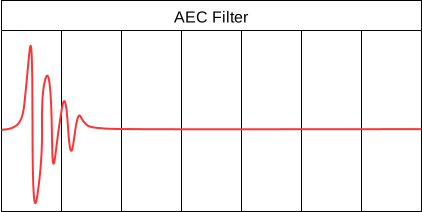
Fig. 24 In this AEC filter, the reference signal and microphone signal are well aligned, and the full impulse response is captured within the filter.
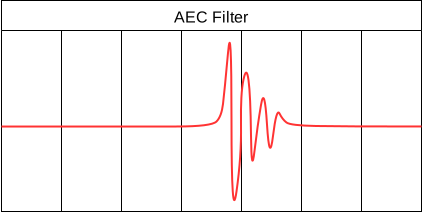
Fig. 25 In this AEC filter, the reference signal arrives before the microphone signal, the start of the filter is filled with zeros and the tail of the impulse response is lost.
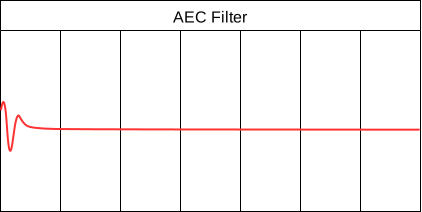
Fig. 26 In this AEC filter, the microphone signal arrives before the reference signal, and the start of the impulse response is lost.
The reference audio path delay and the audio reproduction path delay may be significantly different, requiring additional delay to be inserted into one of the two paths, to correct this delay difference. This can be achieved by either using a fixed delay or ADEC, depending on the system design.
Systems not requiring ADEC
In an ideal system design, the relative delay between the reference audio and microphones is well known and fixed. In these systems ADEC should not be used, and a fixed delay should be applied to either the reference or microphone signals to ensure they are time aligned at the input of the AEC. Examples of systems that do not need ADEC are shown in Fig. 27 and Fig. 28. In both these systems, a fixed delay can be used instead.

Fig. 27 In this system, the reference audio is sent to the XCORE device over I2S from the smart amplifier chipset. This will result in a well defined and fixed delay between the reference audio and the microphone signals, which can be compensated for by applying a fixed delay to either the reference or microphone signals as required, without the need for ADEC.

Fig. 28 In this system, the reference audio is sent to the XCORE device over USB from a host device, and the XCORE device sends the signal to the amplifier and loudspeakers. A duplicate of the signal is sent to the AEC. The timing over USB may vary, but the relative delay between the loudspeaker and microphone signals is fixed, so ADEC is not required.
Systems requiring ADEC
In some applications, it is not possible to know the relative delay between the reference audio and microphone signals, or the delay may vary over time. For example, in a Smart TV, the audio may be played out of the TV’s internal loudspeakers or an external soundbar, and the delay will be different in these two scenarios. An example of this system is shown in Fig. 29. In these applications, ADEC can be used to ensure the reference and microphone signals remain time aligned at the input of the AEC, even when the delay changes.

Fig. 29 In this system, the reference audio is sent to the XCORE device over USB from a host device. The audio reproduction path goes through the Smart TV’s internal drivers, before being processed in the soundbar. Different models of soundbar would have different latencies, and the latency may also change based on the TV’s audio settings, so the relative delay between the reference and microphone signals may be unknown and variable, requiring ADEC to maintain time alignment at the input of the AEC.
Overview
Automatic delay estimation can either be triggered at power-up, manually if the host system configuration changes, or automatically when the AEC performance degrades due to delay changes in the system. For most applications (where a fixed delay cannot be used) it is recommended to enable ADEC on boot, so that the AEC starts with the correct delay and can converge as quickly as possible.
It is advised to only enable the automatic mode of ADEC if it cannot be predicted when delay changes will occur. This is because the automatic mode relies on monitoring the AEC performance and can take some time to react to delay changes, during which the AEC performance may be poor. If the system design allows, it is recommended to trigger delay estimation manually when a delay change is expected, for example by sending a command from the host when the user changes the TV’s audio output settings.
Processing flow
The ADEC process will not begin until the reference signal is present and has sufficient energy.
During normal operation, ADEC monitors the AEC performance and can make decisions about when to apply delay corrections based on the estimated delay and the AEC performance related metadata collected from the echo canceller. The metadata collected from AEC contains statistics such as the ERLE, the peak power seen in the adaptive filter and the peak power to average power ratio of the adaptive filter. ADEC uses the metadata to measure the AEC goodness, and will modify the delay if the goodness falls.
Possible causes that may trigger an estimation cycle (where automatic mode is enabled):
Host changing applications causing a delay change between loudspeakers and reference.
Large volume changes between the reference and the loudspeaker play-back.
User equipment changes, such as switching from TV audio output to playing the audio through a soundbar.
If the goodness falls, ADEC will first try to correct the delay by applying a small delay correction to the input of the echo canceller.
If the goodness does not improve after the small delay correction, ADEC will transition to delay estimation mode. The delay estimation process re-purposes the AEC to detect larger delays. During estimation, the AEC does not perform cancellation. On entering delay estimation, ADEC requests:
A special delay to be applied at AEC input that will enable measuring the actual delay in both delay scenarios; microphone input arriving at the AEC earlier in time than the reference input as well as microphone input arriving late in time with respect to the reference input.
A restart of AEC in a new configuration that has more adaptive filter phases, in order to have a longer filter tail length that is suitable for delay estimation.
Once the ADEC has a measure of the new delay, it requests a delay correction and a reconfiguration of the AEC back to its normal mode. The AEC restarts and reconverges based on the corrected delay, and ADEC goes back to its normal mode of monitoring AEC performance and correcting for small delay offsets.
Usage
For most applications where a fixed delay cannot be used, it is recommended to enable ADEC on boot
so the AEC starts with correct delay alignment and converges quickly. Enabling automatic
mode should be reserved for systems where delay changes cannot be predicted, as ADEC relies on
monitoring AEC performance and may take time to react to changes. When possible, trigger delay
estimation manually (via force_de_cycle_trigger) when delay changes are expected, such as when
users change audio output settings.
Before processing any frames, the application must configure and initialise the ADEC instance by
calling adec_init(). This function takes a pointer to the adec_state_t
structure and a pointer to an adec_config_t configuration structure. Example configurations
can be seen in the Configuration section below.
For each frame of audio, the application should:
Call
adec_estimate_delay()with the AEC filter coefficients to estimate the current delay. This function analyzes the AEC filter phases to determine the peak energy location, which indicates the delay.Call
adec_process_frame()with the delay estimate and AEC statistics. This function uses the delay estimate along with AEC performance metrics (ERLE, peak power, etc.) to make decisions about whether delay correction or AEC reconfiguration is needed.
Refer to the Pipeline Stage 1 source code to see how to use these APIs and to the Pipeline example to see how to use ADEC within the Stage1 API.
Configuration
ADEC is configured through the adec_config_t structure passed to adec_init().
This configuration can also be modified at runtime by accessing the adec_config member of the
adec_state_t structure.
Example configurations are provided in the adec_init() API documentation. See
the doxygen comments in lib_voice/api/adec/adec.h for complete code examples showing:
ADEC configured for delay estimation only at startup (with
bypass = 1)ADEC configured for automatic delay estimation and correction (with
bypass = 0)
Note that when ADEC is enabled on boot, the AEC will initially be used for delay estimation. As a result the AEC convergence will not begin until ADEC has estimated the delay and reconfigured the AEC to normal mode. This can result in poor echo cancellation for the first few seconds after boot.
Delay buffer constraints
The maximum delay that can be corrected is limited by the delay buffer size, which is defined by
ADEC_DE_DELAY_SAMPS (corresponding to ADEC_DE_DELAY_MS milliseconds, default
150 ms). The ADEC can measure and correct delays within the range of ±150 ms relative to the
current delay setting.
When requesting delay corrections, ADEC includes a headroom margin (defined by
ADEC_DE_DELAY_HEADROOM_SAMPS, default 240 samples or 15 ms) to ensure that the microphone
signal does not arrive earlier than the reference signal, which would prevent the AEC filter from
converging due to lack of causality.
Manually triggering ADEC
ADEC can be manually triggered to start a delay estimation cycle by setting the
force_de_cycle_trigger member of the ADEC configuration to 1. This can be used to get an initial
delay estimate at boot, or to trigger a new estimation cycle when a delay change is expected, for
example when the user changes the TV’s audio output settings.
Parameters
ADEC has two user configurable parameters, both part of the adec_config_t structure:
adec_config_t.bypass- When set to 1, ADEC evaluates the current input frame metrics but does not make any delay correction or AEC reset and reconfiguration requests. This is useful for testing or when delay correction needs to be temporarily disabled. Default: 0.adec_config_t.force_de_cycle_trigger- When set to 1, ADEC bypasses the normal monitoring process and immediately transitions to delay estimation mode for measuring the delay offset. This is useful for triggering delay estimation at startup or when the system configuration is known to have changed. When using ADEC through the Pipeline Stage 1 (recommended), this flag is automatically reset to 0 after triggering the delay estimation transition. If using ADEC directly, the application must manually reset this flag to prevent repeated DE cycles. Default: 0.
Both parameters can be modified at runtime by accessing the adec_config member of the
adec_state_t structure.